
Jono Nourse
- 11 Sep, 2026
AI Agents That Work While Your Team Sleeps
Most AI pilots stall before they finish real work. This post breaks down five traits of agents that actually deliver, using JD Trask's overnight-work …
Read article
Jono Nourse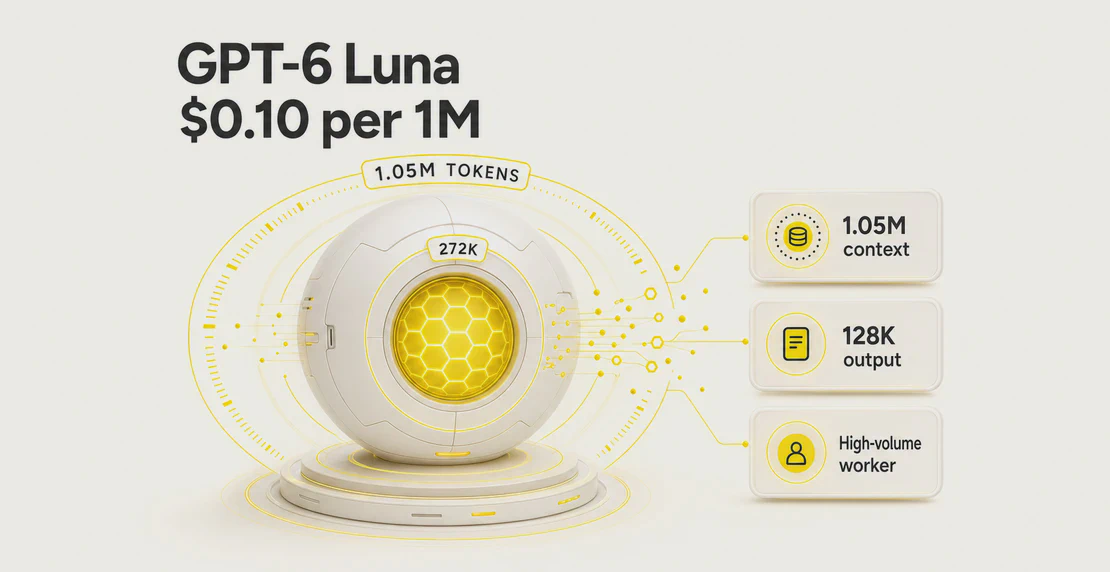
OpenAI released GPT-6 Luna on 22 September 2026, alongside GPT-6 Sol. It’s live in Autohive now, listed under OpenAI as “GPT 6 Luna” (model key gpt-6-luna). Standard list price is $0.10 per 1M input tokens, $0.01 per 1M cached input reads, and $0.50 per 1M output tokens (as of 22 September 2026, per OpenAI’s official pricing page). It reads text and images, writes text, and holds a 1,050,000-token context window. Luna is the low-cost member of the GPT-6 family. It’s built for high-volume, well-defined jobs, not deep reasoning.
| Item | Detail |
|---|---|
| Name | GPT-6 Luna |
| API / model key | gpt-6-luna |
| Released | 22 September 2026 |
| In Autohive | Active now (OpenAI -> “GPT 6 Luna”) |
| Context window | 1,050,000 tokens |
| Max output | 128,000 tokens |
| Knowledge cutoff | 18 May 2026 (OpenAI-reported) |
| Inputs | Text, image |
| Outputs | Text |
| Standard price /1M | $0.10 input, $0.01 cached read, $0.50 output |
| Reasoning effort | none, low, medium (default), high, xhigh, max |
| Autohive support | Tool calling, image input, reasoning, streaming |
Luna also shipped the same day in GitHub Copilot, alongside the direct API and ChatGPT.
Cost is the real story here. GPT-6 Luna’s output price is $0.50 per 1M tokens, against $1.20 for GPT-5.6 Luna. That’s about 58% cheaper, and Luna keeps the same 1.05M-token window. That shifts the math for any job you run thousands of times a day: ticket triage, tagging, extraction, routing, and short drafts.
Put Luna on the repetitive, easy work, and save Sol or Astra for the few steps that need real thinking. For more on splitting jobs across models, see how to choose the right model.
Use Luna for: classification, tagging, routing, data extraction, summarizing, drafting from templates, scheduled sweeps, and worker steps inside a multi-agent system.
Skip Luna for: hard multi-step reasoning, long-horizon coding, tricky debugging, and long autonomous tool loops where small errors pile up. Route those to Sol or Astra.
All prices below are OpenAI list rates per 1M tokens, taken from the official API pricing page and the API changelog entry for this release. These are not Autohive credits. Autohive bills in workspace credits, so check your allowance on the pricing page and in the billing docs.
| Mode | Input | Cached read | Output |
|---|---|---|---|
| Standard | $0.10 | $0.01 | $0.50 |
| Above 272K input | $0.20 | $0.02 | $0.75 |
| Batch / Flex | $0.05 | $0.005 | $0.25 |
| Fast | $0.20 | $0.02 | $1.00 |
Notes:
If a single request goes over 272,000 input tokens, OpenAI charges the whole request at the higher rate: $0.20 input, $0.02 cached read, and $0.75 output. It’s not just the tokens above the line. The full request moves up a tier.
These use OpenAI list rates, not Autohive credits. Assumptions are shown so you can check the math. Tool fees are separate unless stated.
| Scenario | Assumptions | Luna cost |
|---|---|---|
| 1. Support triage | 10,000 tickets/month, 300 input + 50 output tokens each | $0.55/month |
| 2. Research and draft | 20 jobs/month, 15 web searches + ~40K input + 3K output each | $3.11/month |
| 3. Long contract review | 5 reviews/month, 800K input each (long-context rate applies) | $0.80/month |
| 4. Cached daily prefix | 10,000 calls/day reusing a 50K-token static prefix | $5.00/day |
Scenario 1. Input: 10,000 x 300 = 3M tokens x $0.10 = $0.30. Output: 10,000 x 50 = 0.5M tokens x $0.50 = $0.25. Total: $0.55 for 10,000 tickets.
Scenario 2. The web search fee drives the bill, not the tokens. 15 searches x 20 jobs = 300 calls x $10 per 1,000 = $3.00 flat, the same on every model. Token cost per job is 40K input + 3K output: on Luna that’s $0.0055, or $0.11 across 20 jobs. Total for Luna: $3.11. On Sol, the same tokens cost 20x more ($2.20 across 20 jobs), for a total of $5.20. On Astra, tokens cost 100x more ($11.00 across 20 jobs), for a total of $14.00. Same searches, same fee, very different token bills, because Sol and Astra charge 20x and 100x Luna’s per-token rate.
Scenario 3. Each review is 800K tokens, over the 272K line, so all three models bill at their long-context input rate: Luna at $0.20/1M, Sol at $4.00/1M, Astra at $20.00/1M. For 5 reviews at 800K tokens each (4M tokens total): Luna costs 4M x $0.20 = $0.80, Sol costs 4M x $4.00 = $16.00, and Astra costs 4M x $20.00 = $80.00, plus a small amount on each for short summary output. Sol runs 20x Luna’s cost here, and Astra runs 100x. Luna is the only one of the three cheap enough to run this kind of bulk long-document work without a second thought.
Scenario 4. Without caching, 10,000 calls x 50K tokens x $0.10/1M = $50/day just for the repeated prefix. With cached reads at $0.01/1M, the same prefix costs $5.00/day, plus a one-time cache write of about six-tenths of a cent. That’s a 10x cut on the static part of your prompt, before outputs and tools. If your agent reuses the same system prompt or reference block all day, turn caching on.
All four share the same 1.05M context window and 128K max output. Price is what separates them.
| Model | Input /1M | Cached read /1M | Output /1M | Context |
|---|---|---|---|---|
| GPT-6 Luna | $0.10 | $0.01 | $0.50 | 1.05M |
| GPT-6 Sol | $2.00 | $0.20 | $10.00 | 1.05M |
| GPT-6 Astra | $10.00 | $1.00 | $50.00 | 1.05M |
| GPT-5.6 Luna | $0.20 | $0.02 | $1.20 | 1.05M |
Luna vs Sol. Sol costs 20x more on both input and output. Use Sol when a step needs stronger reasoning or more careful writing, and keep Luna on the volume work feeding it.
Luna vs Astra. Astra is the flagship, at 100x Luna’s input rate and 100x its output rate. It’s also OpenAI’s first model rated Critical for cybersecurity capability, which tells you the kind of work it’s built for. For routing, tagging, and extraction, Astra rates buy you nothing extra.
Luna vs GPT-5.6 Luna. GPT-6 Luna costs less than GPT-5.6 Luna on both input and output, and keeps the same context window and max output. Input drops from $0.20 to $0.10 per 1M tokens, a 50% cut. Output drops from $1.20 to $0.50 per 1M tokens, a cut of about 58%. Both figures come from OpenAI’s official model pages (GPT-6 Luna, GPT-5.6 Luna). If you were routing work to 5.6 Luna, the swap makes sense on price alone. There’s no published evidence yet that GPT-6 Luna handles harder tasks better than GPT-5.6 Luna, so treat this as a price change rather than a capability upgrade. See our earlier note on that shift in GPT-5.6 pricing changed.
A clean price comparison is possible here. It’s each vendor’s cheapest current text model, checked against official pricing pages on launch day.
| Model | Vendor | Input /1M | Output /1M | Context window |
|---|---|---|---|---|
| GPT-6 Luna | OpenAI | $0.10 | $0.50 | 1.05M tokens |
| Claude Haiku 4.5 | Anthropic | $1.00 | $5.00 | 200K tokens |
| Gemini 2.5 Flash-Lite | $0.10 | $0.40 | ~1.05M tokens |
Gemini 2.5 Flash-Lite is the real peer here: near-identical price to Luna, and a context window within rounding error of Luna’s. Claude Haiku 4.5 costs 10x more per token than Luna and caps out at 200K tokens, a fifth of Luna’s window, according to Anthropic’s pricing docs.
Benchmarks are different. OpenAI, Anthropic, and Google each run their own test suites, and no shared, standardized benchmark covers all three on launch day. Run your own evaluation on your real tasks instead.
Treat OpenAI’s figures as vendor-reported. OpenAI’s launch post puts Luna’s score at 66.6% on DeepSWE v1.1 at max reasoning effort.
Artificial Analysis measured Luna at 64% on the same benchmark, a small drop from GPT-5.6 Luna’s 66%. The same benchmark name produced a different number because test methods differ. A vendor score should not be treated as settled fact.
On factual accuracy, OpenAI says GPT-6 models make fewer false claims about their own coding work than GPT-5.6 did. Artificial Analysis’s separate hallucination tracker backs the direction, if not the scale: Luna’s hallucination rate on that test dropped from 93% to 77%, while raw accuracy barely moved, 44% versus 43%. Luna still gets many hard factual questions wrong. Keep its jobs short, checkable, and low-stakes.
OpenAI classifies both Sol and Luna as High capability in the cybersecurity and biological/chemical domains under its Preparedness Framework. That sits one tier below Astra, which is the first OpenAI model rated Critical for cybersecurity capability. Follow OpenAI’s deployment guidance if your use touches sensitive areas.
Pick Luna in Agent Creator, or switch an existing agent’s model under OpenAI in its model settings. Call the gpt-6-luna API directly if you’re building outside Autohive. Inside Autohive, it’s a dropdown.
A good default setup: Luna handles extraction, classification, cleanup, and routing, then passes the small number of hard steps to Sol or Astra.
gpt-6-luna).none for simple extraction and classification, and higher settings only when a job needs it.How much does GPT-6 Luna cost? Standard list price is $0.10 per 1M input tokens, $0.01 per 1M cached reads, and $0.50 per 1M output tokens (as of 22 September 2026, per OpenAI’s pricing page). Requests over 272K input tokens are billed at $0.20 input and $0.75 output for the whole request. Batch/Flex is $0.05 input and $0.25 output. These are OpenAI list rates, not Autohive credits.
What is the model key?
gpt-6-luna. In Autohive it shows as “GPT 6 Luna” under OpenAI. Call it directly through the gpt-6-luna API if you’re building your own integration.
Is Luna good for coding? For small, contained tasks, yes. For long-horizon coding, tricky debugging, or big refactors, no. Route those to Sol or Astra.
How is it different from GPT-5.6 Luna? It has the same 1.05M context and 128K output, with lower prices. New Luna is $0.10 input and $0.50 output, against $0.20 and $1.20 for 5.6 Luna, a 50% cut on input and about 58% on output.
Can it use tools and reasoning at the same time?
In Chat Completions, function calling only works when reasoning_effort is set to none. If your agent needs both tool calls and reasoning, use the Responses API. In Autohive, tool calling, reasoning, image input, and streaming are supported.
GPT-6 Luna is active in your model registry now. Register for Autohive and switch a high-volume agent to it, or use the quickstart guide to build your first low-cost worker agent.

Written by
Jono is the Marketing Operations Lead at Autohive, bridging the gap between commercial strategy and AI-powered execution. With a passion for building systems that scale, he brings structure to complexity and turns marketing activity into measurable …
Jono NourseMost AI pilots stall before they finish real work. This post breaks down five traits of agents that actually deliver, using JD Trask's overnight-work …
Read article Jono Nourse
Relay.app users are on a hard export deadline, and Autohive offers one of the faster paths back to visual workflows, plain-language agents, and human …
Read article