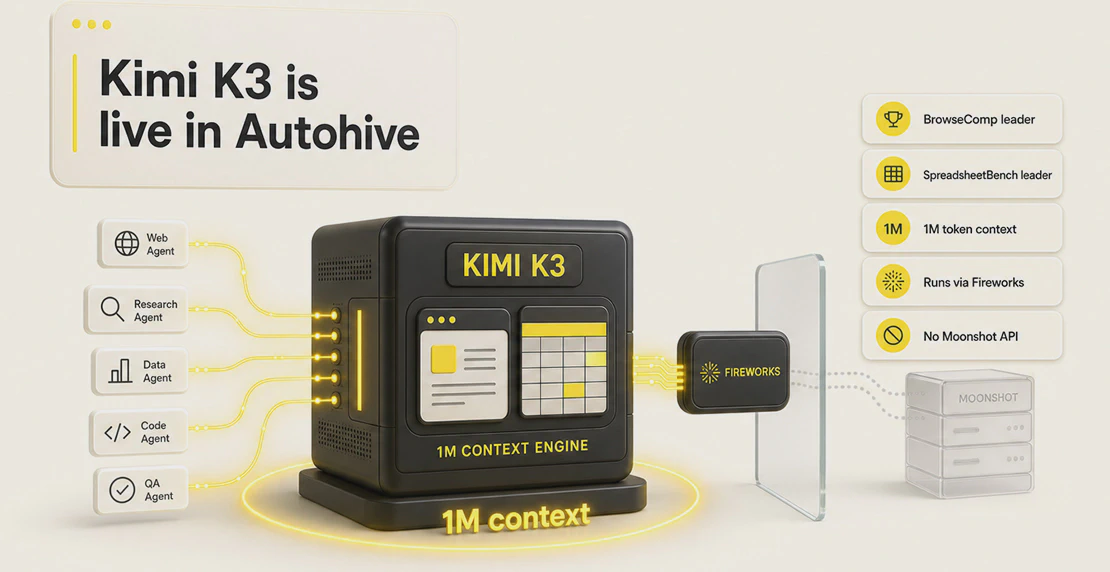
We’ve added Kimi K3 to the Autohive model dropdown, filed under Fireworks in the agent creator. There’s no Moonshot account to create, no separate API key to manage, and no extra setup required. Select it from the list and your agent runs on it.
Kimi K3 is Moonshot AI’s open-weight frontier model, and it’s one of the strongest options available right now for agent work: coding, browsing, spreadsheets, document analysis, and long multi-step automation. Below is what it does well, how it stacks up on benchmarks and price, and the part that matters most for anyone handling business data: how Autohive runs it.
What Kimi K3 actually is
Kimi K3 is a sparse Mixture of Experts model with a very large parameter count. The practical specs that affect your agents:
- Context window: 1,048,576 tokens, roughly a million. You can feed it entire document sets, long chat histories, or big spreadsheets without chopping them into pieces.
- Max output: 131,072 tokens.
- Native multimodal: it reads text, images, and video, so chart analysis and visual agent work happen in the same model.
- Capabilities on Autohive: vision, tool use, reasoning, and streaming.
It reasons at maximum effort by default. That’s a design choice by Moonshot, and it’s why Kimi K3 does well on hard, multi-attempt problems. It’s also a caveat worth keeping in mind before you switch every agent over to it. More on that below.
These are published benchmark results comparing Kimi K3 against the current closed frontier models. General and visual agent scores ran at max or xhigh thinking effort. Fable 5 results include potential fallbacks, and GPT-5.6 Sol results include potential cyberguards, so read those two with that in mind.
General agents
| Benchmark | Kimi K3 | Fable 5 | GPT-5.6 Sol | Opus 4.8 | GLM-5.2 | GPT-5.5 |
|---|
| Automation Bench | 30.8 | 29.1 | 29.7 | 27.2 | 12.9 | 22.7 |
| SpreadsheetBench 2 | 34.8 | 34.7 | 32.4 | 31.6 | 28.1 | 29.1 |
| BrowseComp | 91.2 | 88.0 | 90.4 | 84.3 | - | 84.4 |
| AA-Briefcase (Elo) | 1548 | 1583 | 1495 | 1354 | 1260 | 1158 |
| JobBench | 52.9 | 57.4 | 46.5 | 48.4 | 43.4 | 38.3 |
| GDPval-AA v2 (Elo) | 1668 | 1760 | 1748 | 1600 | 1514 | 1494 |
Kimi K3 leads outright on the three benchmarks that map most directly to Autohive work: automation, spreadsheets, and web browsing. It tops Automation Bench, the closest proxy for scheduled jobs and multi-step agents. It edges out every model on SpreadsheetBench 2, which matters if you’re building Google Sheets or data-analysis agents. And it takes the top spot on BrowseComp at 91.2, ahead of both GPT-5.6 Sol and Fable 5, a strong sign for research and browsing agents.
It sits second on AA-Briefcase and JobBench behind Fable 5, and mid-pack on GDPval-AA. It isn’t the best at everything. But on the tasks most Autohive customers actually run, it’s at or near the front.
Visual agents
| Benchmark | Kimi K3 | Fable 5 | Opus 4.8 | GPT-5.6 Sol | GPT-5.5 |
|---|
| CharXiv (RQ, with tool) | 91.3 | 93.5 | 89.9 | 89.4 | 89.0 |
| Zerobench (with tool, Pass@5) | 41.0 | 46.0 | 34.0 | 35.0 | 41.0 |
On visual reasoning, Kimi K3 lands second behind Fable 5 on both tests, ahead of Opus 4.8 and the GPT-5.6 Sol / 5.5 pair. For chart reading and document-image analysis, it’s a capable choice, though Fable 5 has the edge if visual work is your main need.
Pricing
Sticker price is where Kimi K3 separates from the pack. Current Kimi K3 pricing per million tokens:
| Model | Input (per 1M tokens) | Output (per 1M tokens) | Cached input |
|---|
| Kimi K3 | $3 | $15 | $0.30 |
| GPT-5.6 Sol | $5 | $30 | - |
| Opus 4.8 | $5 | $25 | - |
| Fable 5 | $10 | $50 | - |
Output tokens are where cost adds up in agent loops, and Kimi K3’s $15 output rate is half of GPT-5.6 Sol’s and less than a third of Fable 5’s. Cached input at $0.30 per million helps even more on agents that reuse a large fixed context, like a system prompt plus reference documents on every run.
One honest caveat: Kimi K3 reasons at max by default. On a long-running agent that loops many times, that always-on reasoning generates more tokens per task than a model you can dial down. The per-token price is low, but per-task cost on a heavy loop can climb. On Autohive, credit consumption varies by task complexity. See Autohive pricing for plan details and credit volumes.
Where it fits, and where it doesn’t
Kimi K3 is a model for demanding work, not for every small task. Point it at:
For high-volume, low-stakes tasks (short classifications, quick lookups, simple formatting), a lighter model is the better call. A common pattern: run Kimi K3 for the hard reasoning step and a cheaper model for the rest. You can wire that up in a multi-agent setup so each job goes to the model that fits it.
The part that matters: your data doesn’t go to Moonshot
Most “Kimi K3 is available” announcements skip over this part.
If you call Moonshot’s hosted API directly, your prompts and your business data travel to Moonshot’s infrastructure. For a lot of enterprise teams, that alone rules the model out, regardless of how well it scores.
Because Kimi K3 is an open-weight AI model, it doesn’t have to run that way. On Autohive, it runs through a US-based inference layer via Fireworks AI, not through Moonshot’s API. Your prompts, your data, and your business logic stay inside Autohive’s AWS infrastructure. Nothing you send to a Kimi K3 agent reaches Moonshot’s servers.
That’s the headline. The details underneath it:
- Runs on AWS. Autohive’s infrastructure sits on AWS, which holds SOC 2 Type II and ISO 27001 certifications. Autohive is currently working through SOC 2 attestation.
- Encrypted in transit and at rest. Traffic between services stays inside VPCs with strict security groups. Data in transit uses TLS 1.2 or higher. Data at rest uses AES-256.
- Per-conversation keys. Every workspace and every conversation is encrypted with its own unique key. Workspace data is isolated by design.
- Zero-knowledge by architecture. No Autohive admin can read your workspace content. It’s built into how the system works, not a policy someone could change.
- Never used for training. Your data is never used to train the underlying model, or any third-party model.
You can read the full detail on our security and compliance docs and the Autohive security page.
To be exact about the claim: Autohive routes Kimi K3 through a controlled provider path (Fireworks AI) rather than Moonshot’s hosted API. The model weights are the same. Where your data goes is not.
How to use it
Open the agent creator, go to the model dropdown, and select Kimi K3 under Fireworks. If you’re new to this, the Creating Your First Agent guide walks through the dropdown. For something built around a specific job, see How to Build a Custom Agent.
Use it where the work is hard enough to earn the reasoning: automation, spreadsheets, research, and long-context analysis. Pair it with lighter models for the routine parts. Watch your token usage on long loops and tune from there.
Questions about plans and what’s included? See Autohive pricing.

Jono Nourse