
Jono Nourse
- 23 Jul, 2026
Fast, low-cost Gemini Flash models are now live on Autohive
Gemini 3.6 Flash and Gemini 3.5 Flash-Lite are now live on Autohive. These fast, low-cost models are built for everyday agent tasks, from document …
Read article
Jono Nourse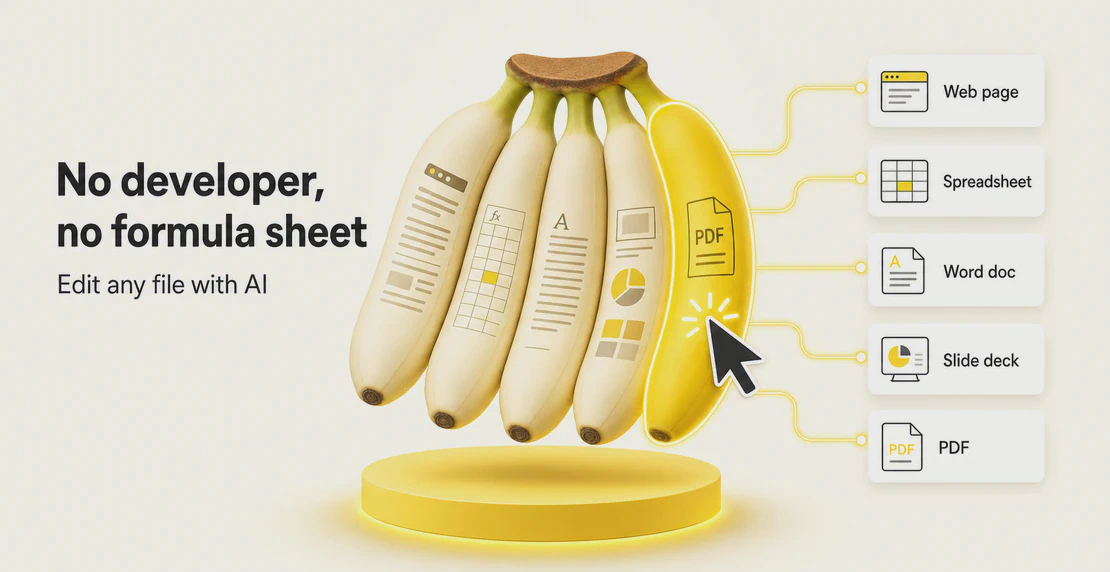
You ask an AI to fix something and it hands you a tidy answer. Then the real work starts: copying the text back in, fixing the formatting it broke, realizing it touched the wrong section anyway. The answer was fine. Getting it back into your file cost you ten minutes and whatever patience you had left.
That round trip disappears inside Autohive. Open a file, click the exact part you want changed, describe the change in plain words, and it updates only that part. This works right now for every Autohive user across five surfaces: web pages, spreadsheets, Word documents, PowerPoint decks, and PDFs. You skip the code, the formulas, and the menu hunting.
Most AI editing tools make you the middleman. You explain the whole file to a chatbot, wait for a full rewrite, then reassemble everything yourself. Autohive flips that order: select the element, the cell, the paragraph, or the slide, and tell the AI what to do with it. Everything else on the page stays exactly as it was.
If you’ve used Google Docs’ Help me write tool to highlight a paragraph and get it rewritten in place, this will feel familiar. Autohive uses that same logic across every file type you touch, so it works as an AI website editor as much as a writing assistant.
There’s a name for this in interface design: direct manipulation, the idea that you act directly on the thing you care about instead of describing it to a go-between. Most AI tools skip that. Autohive doesn’t.
Phil wanted to prove how fast this works, so he grabbed a web page about bananas and started poking at it. He clicked the headline and asked for a new font, and it switched instantly. He clicked a button and asked for a different color, and it changed while he watched. Then he selected the intro paragraph and asked for a full rewrite, and the new copy dropped straight into place.
He didn’t need a developer, a style panel, or an export to another tool. He pointed at what he wanted changed and asked for it.
These sit among the no-code AI tools built into the surfaces you already use:
Web pages. An agency team can open a client landing page in the HTML viewer, click a call-to-action button, and ask for a bolder color and punchier copy. This is where editing a web page with AI stops being a developer request and becomes something anyone on the team can do. See the HTML viewer release notes for what it covers.
Spreadsheets. A cafe owner in NZ reviewing a weekly sales sheet can select a range and ask for a running total, or highlight the columns that dipped, or reformat the numbers as currency. The formula gets written for them, which is AI spreadsheet editing without the formula guide open in another tab.
Word documents. A consultant can select a stiff paragraph in a proposal and ask for a warmer, shorter version, then reformat a heading, all in the same view.
PowerPoint decks. Someone prepping a pitch can click a slide and ask to trim the copy, reorder the points, or tighten the layout before a client call.
PDFs. A property manager can select text in a supplier quote and ask for a targeted change, without exporting the file, converting it, or importing it back.
Precision matters here. You’re not gambling on the AI touching the right section. You choose it. What you didn’t select doesn’t move.
Turnaround matters too. The copy-paste tax quietly eats your afternoon. Cut it and small edits take seconds, so you make more of them instead of avoiding the chore.
So does access across the team. Anyone on the team can open a file and describe a change in plain language. That spreads the work around instead of resting on one spreadsheet expert. Our guides on managing your content and collaborating with your team cover how that plays out day to day.
And every plan includes unlimited seats, so bringing the whole team in costs nothing extra per head. Check the details on the pricing page.
We move quickly on things we want to use ourselves. The team demoed the document editing workflow on a Friday, and it was live for customers by the following Monday. Since then it’s become part of how we mock up and refine our own work, from client pages to internal decks.
This is live now for every Autohive user. Open any page, sheet, doc, deck, or PDF, select the part that needs changing, and tell the AI what you want. That’s the whole workflow for editing documents with AI at Autohive, without a developer, a formula sheet, or a menu hunt in sight.
If you’re new to Autohive, head to autohive.com and try it on the next file that’s been sitting on your to-do list.

Written by
Jono is the Marketing Operations Lead at Autohive, bridging the gap between commercial strategy and AI-powered execution. With a passion for building systems that scale, he brings structure to complexity and turns marketing activity into measurable …
Jono NourseGemini 3.6 Flash and Gemini 3.5 Flash-Lite are now live on Autohive. These fast, low-cost models are built for everyday agent tasks, from document …
Read article Jono Nourse
Most AI rollouts don't fail because of the technology. They stall because there's no governance layer keeping output consistent as more people and …
Read article