
Jono Nourse
- 29 Jul, 2026
Use your Autohive agents directly from Slack
Autohive now connects directly to Slack. Teams can use agents inside channels and threads, pass files and images both ways, and keep agent work …
Read article
Jono Nourse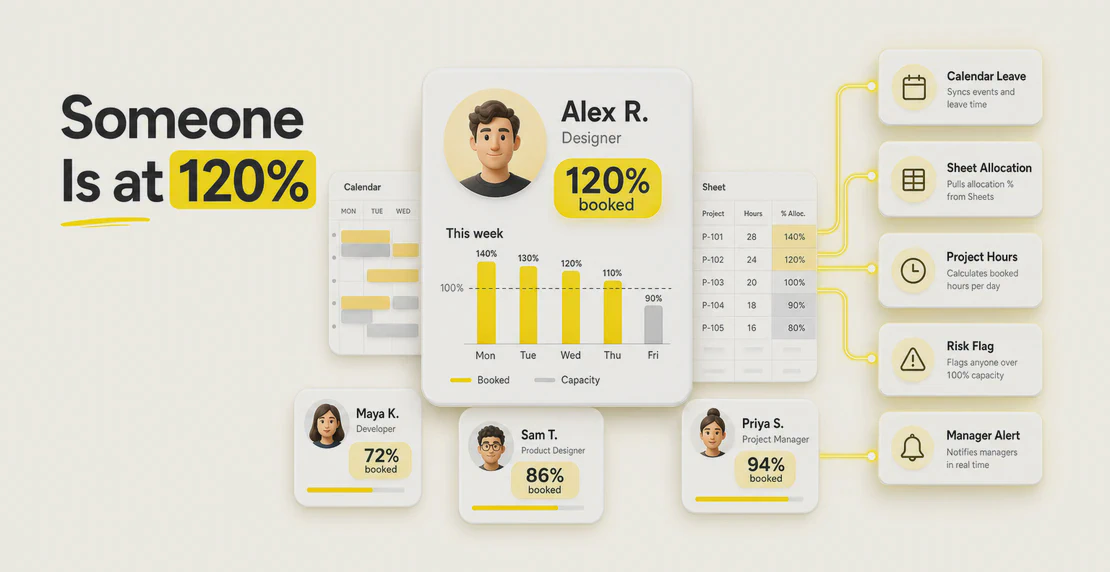
Ask most teams where their capacity data lives and you get a shrug and a list. Leave sits in Google Calendar. Allocations sit in a spreadsheet. Actual project hours might be in Jira, Harvest, or someone’s head. Nobody has the full picture in one place, so planning becomes a weekly game of manual cross-checking that falls apart the moment the team grows past a dozen people.
The data you need already exists. It just doesn’t talk to itself. That’s the gap an Autohive agent closes: pull availability from Google Calendar, read allocations from Google Sheets, do the math, and write the answer back where your team already looks.
Here is how we would architect the agent: Google Calendar becomes the availability source, Google Sheets becomes the planning source, and the Autohive agent sits between them. It reads both on a schedule, compares committed time against planned allocation, calculates each person’s utilization, then writes a clean capacity view back into Sheets and sends the team a summary.
To build it, open Autohive, go to Agent Creator, and start from the custom agent setup flow. Give the agent a prompt like: “I want to create a capacity planning agent that checks Google Calendar availability and compares it with our Google Sheets allocation plan. For each person, calculate available hours, planned allocation, utilization percentage, and remaining capacity. Update the Google Sheet with the results, highlight anyone over 85%, and print a simple dashboard showing who is healthy, at risk, or overbooked.”
Contracted hours lie. A developer on 40 hours a week isn’t available for 40 hours of project work. Standups, one-to-ones, code review, planning sessions, and the general admin of being employed all eat into that number, and none of it shows up in a spreadsheet cell that says “40.”
So planners either ignore the invisible work and over-commit people, or they pad estimates with a gut-feel buffer and lose track of who’s actually free. Over-allocation is the expensive failure here. It shows up as slipped deadlines and, eventually, burnout.
Spreadsheets stick around because they’re flexible and everyone can read them. The problem is the human doing the reconciliation by hand every Monday, not the spreadsheet itself.
The agent leans on a small, deliberate set of API actions.
Google Calendar API covers the availability side:
Google Sheets covers the allocation side:
values.get and batchGet read the allocation tables your planners already maintain.values.update, batchUpdate, and append write calculated utilization and remaining capacity back into the sheet.spreadsheets.batchUpdate handles formatting, so an over-allocated row can turn red without anyone touching it.The Google Sheets API enforces per-minute request quotas, so batching reads and writes matters once you’re processing a real team. Group your calls instead of firing one per cell.
A capacity check runs the same five steps every time:
You don’t run this by hand. Set the five steps up as an Autohive workflow, then let scheduled jobs trigger the whole thing on a cadence, so a capacity check lands every Monday morning before anyone’s opened the planning meeting. The scheduling guide walks through setting the cadence.
Calendar and Sheets are enough to ship a useful agent. Autohive connects to a wider range of integrations, and a few of them turn a decent capacity check into one your team actually trusts.
Slack receives the weekly summary and the alerts. Instead of a spreadsheet nobody opens, the team gets “Priya is at 112% next sprint” in the channel where they already work.
Notion holds the context the numbers can’t. Project scope, deliverables, and assignment notes give the agent a reason behind each allocation, so a flag comes with the project it belongs to.
GitHub adds engineering reality. Open issues, PRs waiting on review, and review load are real work that rarely makes it into a capacity spreadsheet. Pulling that in stops the agent from calling an engineer “under-allocated” while they’re drowning in review requests.
Harvest and Toggl Track close the loop between plan and reality. Compare what you allocated against what people actually tracked, and you find out whether your capacity model reflects how the team really spends its time. If planned and actual keep diverging, your assumptions need fixing, not your people.
Float sits in this space too, on the resource allocation side, and can feed the same planning picture depending on how you set things up.
A few things are worth building for from the start:
Start narrow. Point the agent at one team, connect Calendar and Sheets, and run the loop manually a few times until the numbers match what the team already knows to be true. Once you trust it, put it on a schedule and add Slack so the results reach people without anyone asking.
From there, layer in the context integrations that fit your work: Notion for scope, GitHub for engineering load, Harvest or Toggl to check plan against actual. The custom agent guide covers the build if you want to go deeper.
A fancier spreadsheet isn’t the point. You get your Monday back, and you catch the person who’s quietly booked at 120 percent before the sprint does it for them.

Written by
Jono is the Marketing Operations Lead at Autohive, bridging the gap between commercial strategy and AI-powered execution. With a passion for building systems that scale, he brings structure to complexity and turns marketing activity into measurable …
Jono NourseAutohive now connects directly to Slack. Teams can use agents inside channels and threads, pass files and images both ways, and keep agent work …
Read article Jono Nourse
Assign Claude Opus 5 to the agents and workflows that need deep reasoning and long context, and keep cheaper models on everything else.
Read article