
Reilly Oldham
- 21 May, 2026
Autohive MCP support is here
You can now register any remote MCP server as an integration on Autohive — scoped to your plan, governed by your admins, and available to your agents …
Read article Jono Nourse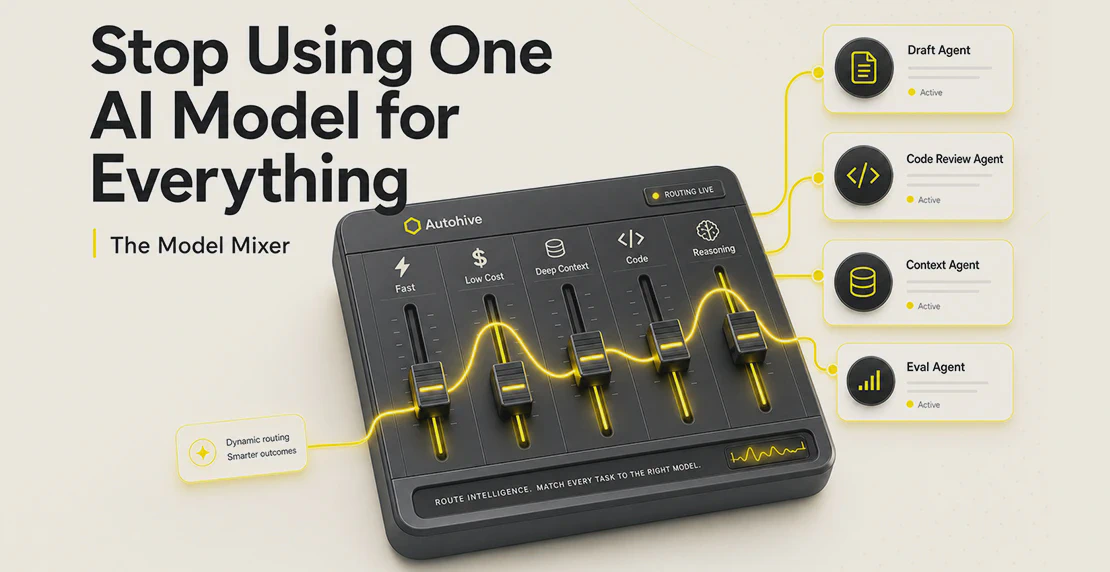
Most teams don’t choose an AI model. They accept one. A vendor bundles a preferred option, a platform sets a default, procurement approves one provider, and the decision calcifies. The model becomes invisible infrastructure, and no one revisits the choice.
That’s starting to cost teams more than they’ve measured.
The real model menu right now looks nothing like the short approval lists most enterprise buyers are working from. Developers running work on multi-model AI inference platforms like Fireworks AI, OpenRouter, and AWS Bedrock are testing models that weren’t on anyone’s shortlist twelve months ago: DeepSeek, Kimi, Qwen, GLM, Mistral, and various Llama-family variants. Some are strong at coding, document reasoning, and structured operations tasks.
Pricing is driving the shift. LLM API pricing has dropped sharply across the board, and developers who pay their own compute bills notice cost differences well before enterprise buyers do. A model that costs a fraction of frontier pricing and handles most of your coding or document tasks doesn’t need to be the best available model. It needs to be good enough for the specific job.
That’s a different evaluation question than “which model scores highest on a benchmark?”
One pattern that surfaces repeatedly among development teams: mainstream coding assistants sometimes block legitimate technical requests. Security-related code, authentication logic, token handling, and code modernization work can trip content filters that weren’t calibrated for professional development contexts. Teams doing security audits, refactoring old systems, or writing tooling around access control have learned to work around these restrictions or route that work through models with different thresholds.
Neither approach is elegant, but the friction is real and worth factoring into model selection.
The reverse concern matters too. AI-generated code has introduced genuine security vulnerabilities, particularly around authentication flows, token storage, and data handling. Choosing a model for coding work should include thinking about what the output looks like and whether it gets reviewed properly before anything ships. Model choice and review process both belong in that decision.
There’s a generation of enterprise software running well past its original design assumptions: undocumented logic, dependencies no one can trace, institutional knowledge that left with people who retired years ago. Getting AI to read that code, explain what it does, trace where data flows, and flag what a refactor needs to address is useful work.
Teams exploring this use case often find that model choice matters less than expected. Most capable models, including several of the less mainstream ones, can read a COBOL block or a layered Java codebase and produce a coherent summary. IBM’s analysis of AI-assisted legacy code modernization makes a similar point: the syntax is rarely the hard part. What’s hard is everything the application runs on and integrates with. The bottleneck is almost always LLM context window management: getting the right sections of code into the right prompt. Model capability matters less than what you feed it.
A new model release lands every few weeks. Teams don’t have the capacity to evaluate every one, and chasing each announcement tends to slow actual work without improving results.
A more useful filter: define what your team specifically needs from a model (speed, context length, code quality, document reasoning, cost per token), then test two or three candidates against real tasks from your own workflow. Public LLM benchmark leaderboards are fine for building a shortlist. They don’t tell you how a model handles your specific prompts, data formats, and edge cases.
If a candidate clears your threshold, switch. If it doesn’t, skip it. The evaluation should take days, not a quarter.
Teams that have run AI in production for a while keep noticing the same thing: output quality tracks with how much structured context you give the model, not with which model you picked.
An organization with no documented processes, no standard operating procedures, and no structured knowledge about its own operations hands an AI agent a vague prompt and wonders why the output is mediocre. A more capable model doesn’t fix that problem. It can make things worse in one way: fluent output is easier to trust, even when it’s still missing what it needed to know.
The teams getting consistent value from AI have usually done at least two things first: they’ve mapped some of their processes in writing, and they’ve thought deliberately about what context an agent needs to do useful work. Model selection matters less than you’d think once those foundations are in place.
A design principle that holds regardless of model choice: keep deterministic software deterministic. Routing logic, validation, and data handling should stay conventional code. AI handles the parts that need judgment or synthesis. Mixing those responsibilities up is where reliability breaks down.
AI model vendor lock-in rarely comes from a contract clause. It creeps in through API-specific formatting, provider-specific tool calls, prompt patterns tuned to one model’s quirks, guardrail logic that assumes a particular behavior, and RAG pipelines that have only ever been tested against one context window.
When the locked-in model changes pricing, shifts behavior after a release, or gets restricted by platform rules you had no hand in writing, switching costs become real.
The practical protection is abstraction. Build workflows with a model abstraction layer so the model is a swappable component. The prompt, the knowledge, the tooling, and the workflow position should all survive a model change without rebuilding from scratch.
Autohive is built around per-agent model assignment. You don’t pick one model for the whole workspace. A research agent can run on Kimi K2.6, a coding agent on DeepSeek V4 Pro, a document summarizer on something faster and cheaper, and a customer-facing agent on whichever frontier model you trust for that exposure.
Autohive supports OpenAI, Anthropic, Google, and xAI alongside non-mainstream options served through Fireworks, including DeepSeek V4 Pro, GLM 5.2, Kimi K2.6, and Qwen 3.7 Plus. Models are also available through OpenRouter and AWS Bedrock global routing variants.
Inside a workflow, each node can be a different agent running a different model. That makes cost routing practical rather than theoretical. Simple summarization or classification tasks go to a lighter, cheaper model. Frontier capacity is reserved for work that actually needs it.
Switching models is low-friction because the agent’s prompt, knowledge base, integrations, and position in the workflow stay intact. You’re changing one variable, not rebuilding the whole setup.
Agents carry their own knowledge bases. The context your team builds, process documents, SOPs, product specs, reference material, lives in your workspace content area, not inside one provider’s ecosystem. Each agent accesses the knowledge it needs for its role. A coding agent can draw on your technical documentation. A customer-facing agent pulls from your product knowledge base. They share a platform, not necessarily a model or a knowledge set.
Scheduled jobs turn AI from a chat tool into a repeatable business process: daily CRM summaries, weekly pipeline reviews, monthly reporting runs. That’s where the value from AI starts to accumulate reliably instead of showing up sporadically.
If you want multiple agents to review the same piece of work, you can @mention them in a single thread. A draft can go through a research agent, a fact-check agent, and a writing agent in one conversation, each using the model you’ve chosen for that role. The integrations into Slack, Notion, GitHub, and other tools put AI inside the workflows your team already uses instead of sending the team somewhere new.
Autohive acts as an abstraction layer between your business workflows and the model providers. Adding a new provider or switching an agent to a different model doesn’t touch the workflow logic. Your team gets a wider model menu without the switching costs that normally come with it.
If your team has only ever used one provider, skip the search for the best possible alternative. Pick one task you’re already running through AI. Run it through a non-mainstream model on an inference platform. Compare the output quality and the cost. If quality is close enough and cost is lower, you’ve found a routing opportunity.
Then do it for another task.
Building that into a real multi-model AI strategy means knowing which model fits which task, designing workflows that make those assignments explicit, and making sure your process documentation and context quality are good enough for any capable model to do useful work. The model is one decision inside a workflow. Treating it as the whole strategy is why so many teams are stuck running the same default they accepted two years ago.

Written by
Jono is the Marketing Operations Lead at Autohive, bridging the gap between commercial strategy and AI-powered execution. With a passion for building systems that scale, he brings structure to complexity and turns marketing activity into measurable …
Reilly OldhamYou can now register any remote MCP server as an integration on Autohive — scoped to your plan, governed by your admins, and available to your agents …
Read article Jono Nourse
The fallout from the Anthropic/OpenAI Pentagon deal demonstrates that for AI users and businesses, security and trust are more valuable than features …
Read article