Most teams hit the same wall with AI agents. They start cautious, so they route every action through a human. A person signs off on each email, each ticket update, each database write. Within a week the approval queue looks like an inbox nobody wants to open. Reviewers stop reading and start clicking approve. The oversight meant to keep things safe turns into a rubber stamp, and the speed the agent promised never shows up.
The opposite failure is just as common. A team wires up an agent, gives it broad access, and lets it run. It works fine until it sends the wrong message to a customer list, writes to production, or approves a refund it shouldn’t have. Now there’s a log showing exactly what happened, which helps the incident report and does nothing to prevent the incident.
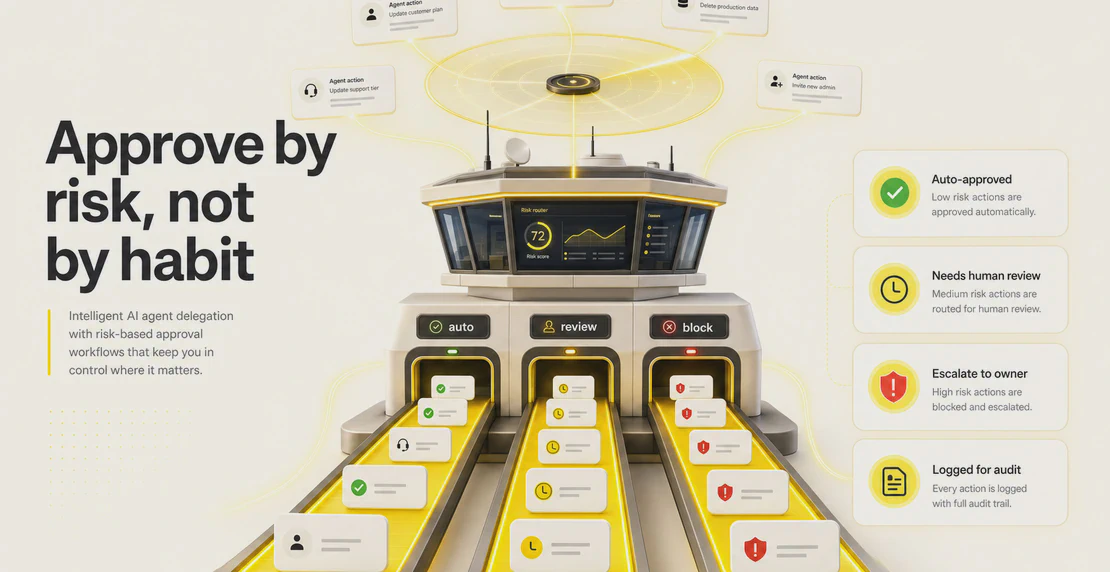
Both problems come from the same root: treating approval as an on/off switch instead of a design decision. Good delegation means deciding what an agent can do on its own, what it has to check first, and who checks it. Get that right and you keep control without turning every task into a committee meeting.
What AI agent delegation actually means
AI agent delegation means handing an agent a goal or a decision boundary and giving it authority to act inside that boundary. The agent plans, sequences steps, and carries them out, rather than following one fixed script.
That’s the line between an agent and plain automation. A traditional automation does the same steps every time in the same order. An AI agent works out the steps itself. Ask it to “resolve this support ticket” and it can read the history, check the account, draft a reply, and update the record, deciding the order as it goes.
In more complex setups, delegation happens between agents too. A supervisor or orchestrator agent breaks an objective into subtasks and hands each one to a specialist agent. The supervisor plans and pulls the results back together; the specialists do the focused work.
A few common multi-agent AI system architectures are worth knowing:
- Hierarchical. One supervisor plans and delegates; specialist agents execute. Accountability is clear and debugging is straightforward, but the supervisor becomes a single point of failure.
- Flat or peer-to-peer. Agents coordinate sideways with no central boss. More resilient, but harder to manage as the number of agents grows.
- Hybrid. The supervisor handles planning and synthesis while agents coordinate directly with each other on subtasks.
The architecture matters less than the principle underneath it. Every time you delegate, you’re granting authority. An approval workflow decides how much authority, for which actions, with what oversight.
Why this is worth getting right now
The market is moving faster than the guardrails. McKinsey’s 2025 State of AI reports that 23% of organizations are already scaling agentic AI somewhere in the business. Earlier research from MIT Sloan and BCG on agentic AI adoption put that figure at 35% of organizations by 2023, with another 44% planning to deploy soon after.
Governance is lagging behind. In KPMG’s Q4 AI Pulse survey, 65% of business leaders named agentic system complexity as the top barrier to implementation, 60% said they restrict agent access to sensitive data without human oversight, and 75% put security, compliance, and auditability at the top of their priority list for agent deployment.
Gartner has put a number on the risk. It predicts that 40% of enterprises will demote or decommission autonomous AI agents by 2027, largely because of governance failures. The specific failure it names is worth sitting with: applying uniform governance across agents that have different autonomy levels and different scopes. Treating a read-only research agent the same as one that can move money is what breaks programs.
That’s the whole case for risk-based approval. One rule for every agent either strangles the low-risk work or under-protects the high-risk work. Usually both.
Where approval gates belong
The single most important rule: put the gate before the side effect, not after it.
A side effect is anything the agent does that changes the world outside its own reasoning. Sending an email. Writing to a database. Making a payment. Changing someone’s access. Deploying code. Once one of those happens, no approval can undo it. Approval after the fact is a record, not a control.
The cleanest way to think about it is splitting proposing from committing. A healthy flow looks like this:
Propose -> Pending review -> Approved or rejected -> Commit or execute -> Verified
The agent proposes an action and stops. A human, or a policy, decides. Only then does the action fire. The gap between “proposed” and “executed” is where all your oversight lives. Everything before the side effect is safe to let the agent do freely, because nothing has left the building yet. Reading data, analyzing it, drafting a response, working out a plan: none of that needs a gate. The moment before it acts on the outside world does.
This also tells you where gates don’t belong. Don’t gate the agent’s thinking. Don’t ask a human to approve each search or each intermediate calculation. That’s the noise that buries reviewers and trains them to stop reading.
Match the approval level to the risk
A useful way to set expectations is an autonomy ladder. Each rung gives the agent more room, and each rung suits a different level of risk.
- Read-only. The agent observes, retrieves, summarizes, and analyzes. It changes nothing. Almost no approval needed, because there’s nothing to approve.
- Draft and suggest. The agent produces output and waits for a human to approve before anything goes out.
- Supervised execution. The agent runs a whole workflow but pauses at gates before the high-risk steps.
- Monitored autonomy. The agent acts end to end on its own, with full logging and alerts when something looks off.
- Full autonomy. Reserved for repetitive, low-variance, low-risk tasks with clear boundaries and a complete log.
Underneath the ladder sit two oversight models, and picking the right one for each task is half the battle.
Human-in-the-loop AI keeps a person in the decision seat at the risky moments. The agent can’t proceed past the gate without one. Use it for actions that are regulated, irreversible, costly, or have a large blast radius: a payment over a threshold, a change to production, a message to your entire customer base.
Human-on-the-loop lets the agent act on its own while people monitor and step in when needed. Use it for medium-risk, reversible, high-volume work where stopping for every action would defeat the purpose: sorting incoming tickets, tagging leads, drafting internal summaries.
Two ideas decide which model a task deserves. Blast radius is how far the damage spreads if the action is wrong. Reversibility is how easily you can undo it. A high blast radius, hard-to-reverse action belongs in human-in-the-loop. A small blast radius, easily reversed action can run under human-on-the-loop, or with no gate at all once the agent has earned trust.
Five approval patterns worth knowing
Once you’ve placed your gates and matched them to risk, these patterns cover most real situations. You’ll usually mix several across one team.
Action-level gates. A gate fires right before a specific tool call: sending an email, writing to the database, making a payment, changing access, deploying code. This is the workhorse pattern for any agent that touches an external system. The reviewer approves that one action, then the agent continues.
Draft approval. The agent creates a draft and a human approves it before it’s published or sent. Best for content, customer communications, and anything with your name on it. The agent does the heavy lifting; the human owns the final call.
Dual approval. Two people sign off before the action fires. Reserve it for the highest-risk moves: payments, refunds, production deploys, access changes. It’s slower on purpose. You only want it where a single mistaken approval would genuinely hurt.
Sampled review. Once an agent has a track record on a low-risk, high-volume task, stop reviewing every action and review a sample instead. Enough to catch drift, not so much that you recreate the bottleneck. This is a policy your team runs, not a switch you flip, so decide the sample rate and who checks it.
Exception-only review. In a mature workflow, most actions run untouched and a review triggers only when something crosses a risk line: an unusual amount, an unfamiliar recipient, a policy flag. Reviewers spend their attention on the cases that actually need judgment. Getting here takes a workflow you trust and clear rules for what counts as an exception.
One warning about the failure mode at the other end. Reviewing everything feels safe and isn’t. It creates noisy queues, invites rubber-stamping, and pushes frustrated teams toward shadow AI: unofficial tools people use off the books because the sanctioned path is too slow. Logging every action doesn’t fix this either. A log tells you what already happened. Active oversight means someone can stop an action before it happens, not read about it afterward.
What good gates actually contain
The pattern is only as good as the information the reviewer gets. An approval request with no context produces the exact behavior you’re trying to avoid: someone approving without reading.
Give reviewers an evidence pack:
- The proposed action, stated plainly.
- The data the agent used to decide.
- Source links so the reviewer can check the reasoning.
- Any policy flags the action tripped.
- The exact payload that will be sent or written.
- What happens if they approve, and what happens if they reject.
A few more things separate a workflow that scales from one that stalls:
- Route each approval to the right owner. The person with the authority and context, not a shared queue nobody owns.
- Offer approve-with-edits. Not just approve or reject. Reviewers often need to fix a detail rather than send the whole thing back.
- Set timeouts and an escalation path. Decide what happens when an approval sits unanswered. Does it escalate, expire, or hold? Pick deliberately.
- Keep an append-only audit trail. Who approved what, when, why, and the exact payload. Never editable after the fact.
- Redact sensitive data in the request where the reviewer doesn’t need to see it.
- Use idempotency keys for actions that might retry, so an approved payment doesn’t fire twice.
How this looks in Autohive
Autohive gives you the core piece directly. When an agent is about to take an action that needs sign-off, it fires an approval request before executing. That’s the propose-then-commit split built in: the agent proposes, the action waits, a human decides.
Those requests show up in the in-app action box, as mobile push notifications, and in the conversation activity of the relevant chat thread. A request can carry the workspace name, the tool being used, a description of the action, and a direct path to approve or reject. That’s your evidence pack surface: the reviewer sees what’s about to happen and where, before it happens.
The gates fit three product patterns:
- Pre-action gates before a tool fires. This is the action-level gate in practice. Use it whenever an agent touches an external system like Slack, Notion, GitHub, a CRM, a finance tool, or a content tool. The agent stops at the tool call and waits.
- Draft review through @mention. When an agent produces a draft or a plan, it can @mention a teammate to review it in the same thread. That’s draft approval without leaving the conversation.
- Scheduled job monitoring. For lower-risk recurring work, jobs run on a schedule with logs and controls to pause, edit, or delete them. This is the monitored end of the autonomy ladder, with a human on the loop rather than in it. Our AI agent scheduling guide walks through the setup.
The most underrated control isn’t an approval at all. It’s tool access. In Autohive, an agent can only act through the tools and integrations you’ve explicitly granted it. That’s your blast-radius dial. An agent with no payment tool can’t make a bad payment no matter what it decides. Scope the tools tightly and you’ve removed whole categories of risk before you write a single approval rule. You set this when you build a custom AI agent with Agent Creator, alongside its name, model, instructions, and knowledge.
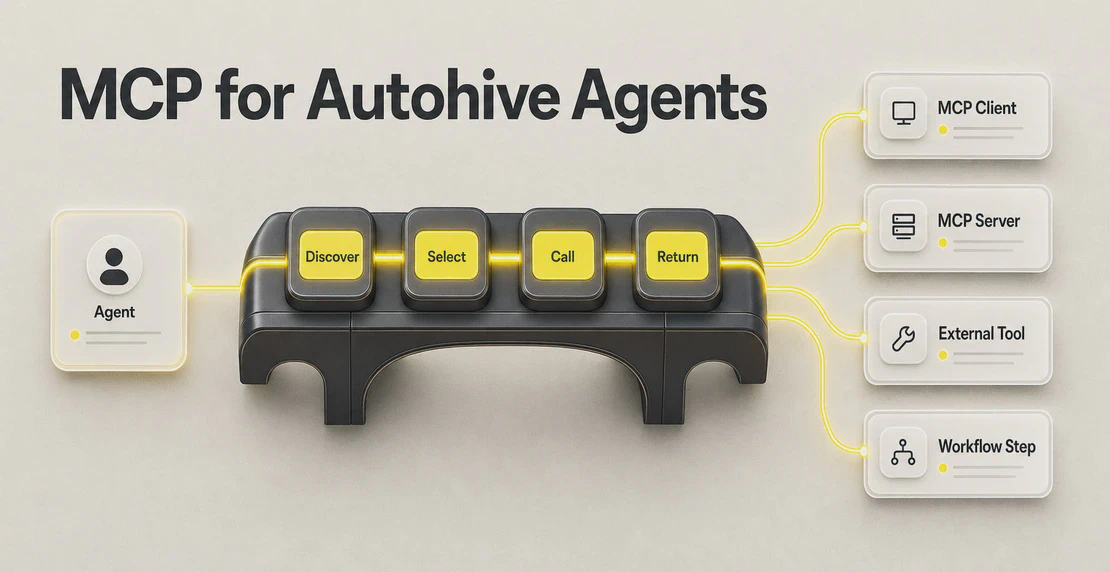
For delegation between agents, Autohive supports multiple agents in a shared workspace and a shared conversation thread. Each agent can have its own instructions, model, knowledge, and tool access. A planning agent can divide the work, specialist agents can take the subtasks, and humans can join through @mentions to unblock a decision. That’s the hierarchical pattern from earlier, made concrete: supervisor plans, specialists execute, human reviews at the gate. The multi-agent AI setup guide covers how to wire this up, and the team AI collaboration guide covers bringing people into the thread.
For repeatable processes, the AI workflow builder connects triggers, agents, tools, conditional branches, and delivery channels without code. Conditional branches are where a lot of exception routing lives: you can send different actions down different paths based on what the data says. If you’re automating a recurring job end to end, the AI job automation guide is a good starting point. The full list of AI agent integrations covers the systems agents can act through, from Slack and Teams to HubSpot, Stripe, Xero, GitHub, and Notion, and the integrations documentation covers how to connect and manage them.
One honest note on scope. Some of the patterns above are design principles your team runs, not switches Autohive flips for you. Dual approval, sampled review, timed SLAs with automatic escalation, and policy-as-code routing aren’t native product features today. You can still apply them: decide who counts as the second approver, set your own sample rate and reviewer, agree what happens when a request goes stale, and use scoped tools plus conditional branches to enforce the rules you care about. The product gives you the gate and the visibility. The policy is yours to design.
A checklist for setting this up
Before you turn an agent loose, work through this:
- List the agent’s actions and sort them by blast radius and reversibility. High blast radius or hard to reverse goes to human-in-the-loop. Low and reversible can run on the loop or ungated.
- Grant the minimum tools. If the agent doesn’t need a tool to do its job, don’t connect it. This is your cheapest and strongest control.
- Put gates before side effects only. Never gate the agent’s reading, thinking, or drafting.
- Pick a pattern per action. Action-level gate, draft approval, dual approval, sampled review, or exception-only. Don’t apply one rule to everything.
- Route each approval to a named owner with the context to actually decide.
- Give reviewers an evidence pack: proposed action, data used, sources, flags, exact payload, consequences.
- Offer approve-with-edits, not just approve or reject.
- Decide what happens on timeout. Escalate, expire, or hold. Make it a deliberate choice.
- Keep an append-only audit trail of who approved what, when, and why.
- Start tighter than you think you need, then loosen. Move actions up the autonomy ladder as the agent earns a track record. Start with sampled review before you drop to exception-only.
- Watch for the bottleneck and the rubber stamp. If the queue is backing up, your gates are too broad. If reviewers approve in under two seconds, they’ve stopped reading. Either one means the design needs a change.
Delegation done well is quiet. The low-risk work moves without anyone watching it, the risky work stops for a human who has what they need to decide, and the audit trail sits there for when someone asks. Oversight where it counts, speed everywhere else. If you’re just getting started, how to create your first AI agent is the place to begin, and you can add gates as the work grows.

Jono Nourse