
Jono Nourse
- 11 Sep, 2026
AI Agents That Work While Your Team Sleeps
Most AI pilots stall before they finish real work. This post breaks down five traits of agents that actually deliver, using JD Trask's overnight-work …
Read article
Jono Nourse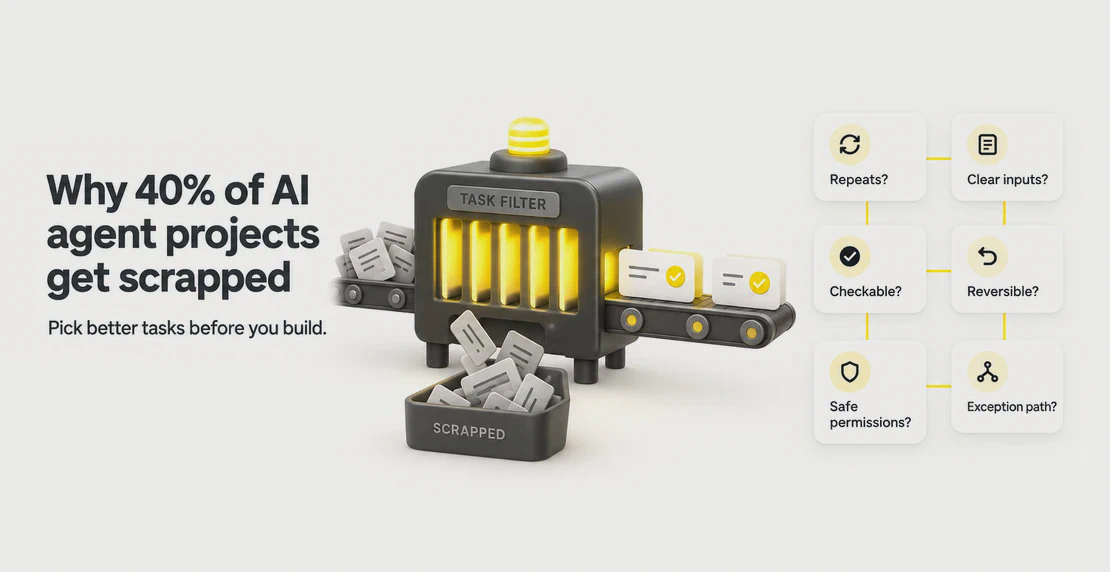
Pick the wrong task to automate and you pay twice. First you build the thing. Then you clean up what it broke. Gartner expects more than 40% of agentic AI projects to be scrapped by the end of 2027. Gartner points to escalating costs, unclear business value, and weak risk controls. In practice, that agentic AI failure rate often comes down to a narrower problem. Teams picked work the agent couldn’t handle, with fuzzy inputs, broken handoffs, and no clear payoff.
So before you build anything, you need a quick filter for what tasks to automate with AI agents. The 10-minute test is a practical rule of thumb. It isn’t a validated formula, and nobody has proven that ten minutes is a magic number. The idea is simple. If you can’t explain a task clearly in about ten minutes, an agent will struggle with it too.
Run six questions against any task and use them as an AI agent task automation checklist. If the task passes, you have a strong candidate. If it stumbles, you’ve found the exact risk to fix before you spend a cent.
Ask these in order. Each one takes a minute or two to answer honestly.
A task that sails through all six is ready to hand off. A task that fails one isn’t ruled out, but you have to close that gap first. Pay closest attention to questions 4, 5, and 6. Teams tend to rush past them, and that’s where the costly surprises show up.
Ten minutes stands in for clarity. It isn’t a scientific cutoff. The real test for when to automate a task is whether you can describe it fully in one short sitting.
If you can walk through a task start to finish in about ten minutes, you probably understand its steps, its inputs, and what a correct result looks like. That understanding is what you feed an agent when you write its instructions. The clearer the explanation, the better the agent performs.
If ten minutes in you’re still saying “it depends” or “you kind of have to know the context,” you have your answer. The task carries hidden judgment. Agents handle bounded work well and open-ended judgment poorly. Foundation Capital points out that errors compound across steps, so a vague multi-step task tends to drift further off course the longer it runs. If the task is too big, break it into a clear workflow of smaller steps you can explain cleanly, then test it again.
Email triage is one of the safest places to start. Most of the output is a draft you approve before anything sends.
An agent can read incoming mail, label it by intent, flag what needs you, and draft replies for routine questions. UiPath counts high-volume, rule-based work like this among the strongest automation candidates. Email triage also fits the six questions well. It repeats daily, the inputs and outputs are clear, and the drafts are easy to check.
Passes: sorting support mail into “billing,” “bug,” and “how-to,” then drafting a first reply for each. You read and send.
Needs a human checkpoint: an agent that replies and sends on its own to anyone outside the company. That fails the reversibility question. Keep it in draft-first mode and review everything before it leaves your outbox.
Meeting notes pass the test easily. The input is a transcript, and the output is a short summary you can check.
An agent can turn a recording into a summary, pull out action items with owners and deadlines, and push them into your tracker so nothing falls through. Microsoft’s Work Trend Index describes agents becoming digital colleagues that take on tasks like this at your direction. They handle the admin around a meeting while you run the meeting itself.
Passes: summarizing a weekly standup, listing each action with an owner and a due date, then updating the project board.
Needs a human checkpoint: reading sensitive conversations like performance reviews or legal discussions. That runs into question 5. The permissions are too broad and the material is too private to hand over without tight limits and a human reading the output first.
Bounded research passes. Open-ended research needs a person checking the sources.
An agent is good at narrow, repeatable questions. Monitor five competitors every Monday. Compare three pricing pages. Collect sources on a defined topic and keep them in a managed content hub so you can check them later. Then send yourself a recurring brief that lands in your inbox on its own. Deep research tools from OpenAI and Perplexity can save real time on questions with clear limits.
Passes: a weekly brief that tracks named competitors’ published pricing changes and links every source.
Needs a human checkpoint: “What should our 2026 strategy be?” That question is open-ended, high-stakes, and hard to verify. OpenAI says plainly that its deep research tool can still hallucinate facts, and the same caution applies to similar tools. Gather and draft with the agent, then make the call yourself.
Recurring reports pass the test well. The figures come from known sources, and the format stays the same each time.
An agent can pull numbers from your apps, check the arithmetic, format the tables, and post a scheduled update to your channel. It repeats on a fixed cadence, the inputs are defined, and you can check the result against the source data.
Passes: a Monday sales summary that reads yesterday’s figures from the CRM, totals them, and posts a formatted table.
Needs a human checkpoint: a board report that mixes raw numbers with a story about why results moved. Automate the figures. Keep the interpretation for yourself. Let the agent draft the tables, then write the story and sign off.
Follow-up work passes in draft form. It fails the moment an agent acts on its own with a customer.
An agent can update CRM records, draft follow-up messages, and route high-risk cases to a person. NBER studied 5,179 support agents and found AI assistance raised productivity by about 14% on average, with the biggest gains for newer staff. The lift is real when a person stays in the loop.
Passes: updating a contact’s status after a call and drafting a check-in email for your review.
Needs a human checkpoint: promising a refund, a discount, or a policy exception. Air Canada learned this the hard way when a tribunal held it responsible for a chatbot that invented a refund policy. You own what your agent says to customers, so keep commitments behind human approval.
Keep a person in control wherever a mistake costs money, trust, or time. Human-in-the-loop AI agents are the safe default. Ethan Mollick names four clear triggers for handing control back to people: when the work needs approval, when it needs real expertise, when variance is high, and when it needs genuine human engagement.
An agent shouldn’t spend money on its own, contact outsiders without review, reach into sensitive data, or take any action you didn’t authorize. The Air Canada case shows why. The company stayed liable for its agent’s words even though no human wrote them. You carry the same responsibility for every agent you run.
In practice, that means setting guardrails before launch: draft-first execution, a written list of forbidden actions, review on anything consequential, tool permissions scoped to the task, and a clear rule for where exceptions go.
Passing the six questions tells you a task is worth trying. It doesn’t promise the agent will do it well.
The NBER result shows why. That 14% average gain was uneven. Less experienced workers gained the most, and the study measured assisted work, not an agent running alone. Your results will vary with your data and how closely you review the output.
The test can’t judge your data quality, catch a poorly written instruction, or predict every exception a real inbox will throw at it. MIT Sloan’s AI decision framework sorts work by ambiguity and risk for exactly this reason. Routine, low-risk tasks are safe to automate. Consequential ones should keep human sign-off. Treat a passing score as a green light for a small, watched pilot. Don’t switch it on and walk away.
| Domain | Candidate task | Test result |
|---|---|---|
| Inbox | Label mail by intent, draft routine replies | Passes in draft-first mode |
| Meetings | Summarize transcript, assign action items | Passes, with limited access to sensitive meetings |
| Research | Weekly brief on named competitors | Passes when the question is bounded |
| Reporting | Scheduled sales summary from CRM data | Passes, but a human writes the narrative |
| Customer follow-up | Update CRM, draft check-in emails | Passes, but refunds and promises need approval |
Don’t score your whole workload at once. Pick a single task you ran this week that felt repetitive, and spend ten minutes running the six questions against it. The best candidates for repeatable work automation are jobs that come around again and again.
Estimate the payoff by multiplying how often the task happens by the time each instance takes. A ten-minute job twice a day beats a two-hour job once a quarter. That rough number gives you a quick read on AI agent ROI. It isn’t a universal threshold.
If your task passes, build a small version and stay in the review loop. Autohive’s guide to building a custom agent walks you through the setup. If it fails a question, you’ve learned something just as useful: the exact risk to fix before you automate.
What if a task fails one question? Treat it as a flag that points to the gap you need to close. Add a draft-first step and approval if mistakes aren’t reversible, or narrow the permissions if they’re too broad. Fix the gap, then run the test again.
Does this apply to one-off projects? Not really. The first question asks whether the task repeats, and a one-off usually fails it. An agent can still help draft or research part of a single project, but the real payoff comes from repeat work.
How is this different from RPA? On AI agent vs RPA, the difference comes down to how each one handles change. Traditional robotic process automation follows fixed rules and breaks when the input shifts. An agent works from natural-language instructions and handles more variation. That flexibility is why checking results and routing exceptions matter more.
What happens when an agent hits an exception? Whatever you decide in advance, which is why question six exists. A good setup has the agent stop and escalate to a named person instead of guessing, so exceptions reach a human every time.

Written by
Jono is the Marketing Operations Lead at Autohive, bridging the gap between commercial strategy and AI-powered execution. With a passion for building systems that scale, he brings structure to complexity and turns marketing activity into measurable …
Jono NourseMost AI pilots stall before they finish real work. This post breaks down five traits of agents that actually deliver, using JD Trask's overnight-work …
Read article Jono Nourse
AI agents can handle rule-based decisions and repetitive busywork, but hiring calls and ethical judgment still belong to people. This post maps out …
Read article